
Full Transcript
This is a short video on using Claude
Code and creating an AI news summary
tool. Stick around till the end to learn
more about Claude Code compares to other
tools.
Last video I’m going to demonstrate
Claude Code and I’m going to show an
example application. Um, really quick
I’m going to show how to get Cloud Code
running on your Mac and then two, I’m
going to build an app and show you what
I learned here quickly using it. First
thing you need to do is make sure you
have Node on your computer. If you
don’t, um, I encourage you to use Brew.
So you would do something like brew
install NodeJS.
Make sure you have Brew installed, but
it’s a great way to get things going. If
you’re going to be using Python, you
want to make sure you have Python
installed as well. Python 3- capital B.
There we go. So you need those two
things. Then you’re just going to run
this npm install. It’s going to run
install cloud code. I already have it
installed, so it ran that quickly. Now,
I like to use I mean, most Claude is
done inside of uh Terminal, but I like
to do that inside of Visual Studio. So,
right here, I’m actually in a terminal
running Claude on the system. And so, um
I’m going to run you through an app I
built. So, first, let’s just take a look
at some of the commands you can do in
Claude. You can see right here it did a
slash and it shows kind of the
information available. You initialize
your project to start with and it
mentions in this claude.md. So, I’ve
created an app. Let’s go take a look at
claude.me here in my app is called the
Claude
AI news summary tool. I wanted to build
a website that aggregates top AI related
news across the web. It’s going to
distill them into a concise list and
then the tool should help the us catch
up on trends, analyze the ecosystem,
meaning, you know, is it a trend, is it
not a trend, and then I wanted to be
able to help me create a blog post or a
social media post, right? So, the idea
is give me a list of all the news
articles out there, summarize them, give
them some ranking, and then let me pick
what I want to create a post for, click
on it, and it will generate a post for
me. Um, I think I spent about 30
minutes. I used this as the guide. So, I
said, uh, AI news aggregator, look for
some news. I put a couple different
places I wanted to grab from. Really
quick, I made it so it’s extendable.
Right now, I’m using RSS
and I’ve got it where it can actually
scrape APIs. Um, I want it to summarize,
so I’m going to use OpenAI. It’s going
to summarize each article in a couple
sentences. And then it’s going to
categorize them by popularity,
sentiment, and then type. And then after
that, it’s going to do a list of those
articles. And then it’s going to give me
a viewer to actually do the summary. And
lastly, it’s going to help me generate
the post. Now, I’ve made it all the way
to number four here, like I said, in
about 30 plus minutes using just this
input. And then working through a series
of things. If I went back in my history,
I’m not actually sure how I do that in
here. Um, if I went back through my
history, um, I asked, well, actually,
what I’m going to ask it to view my
to-do list. So, show me my to-do list.
One of the things that Claude does when
it’s building out is it makes a to-do
list of what it heard you say, what it’s
going to do, and then what executed. So,
in this case, let’s go take a look at
mine. I’m going to see if I can make
this larger and easier for viewing.
Right. Hopefully, that’s a little bit
bigger. So, I said, “Show me my to-do
list.” And here’s what it did. It
updated the styling to match the Austo
digital style. Um, and implemented a
news aggregator. It set up the news API
integration to fetch new articles. It
implemented advanced ranking and scoring
system. It added a trend score, and I’ll
show you that. It created a news date
type and interface, and it implemented a
summary page using OpenAl.
In addition, it added some scoring
metrics and then it did some trending
indicators for the main feed. Now, it
shows a second way here of kind of where
it strikes it out. It did the styling.
And then lastly, it’s going to start
asking me questions about the product
status. Like I’ve got multi-news
aggregators in here and things that I’ve
changed around. Right here, it looks
like it and by doing this, it told me
you spent $5 on anthropic API this
session. Um, that’s not bad. That’s what
I’ve spent so far to build this app. So
before I go any further, let’s go take a
look at the app. And you can see here
it’s Genali’s code. I will bring it up
and we can walk through it really quick.
So before I run it, it’s going to run on
local host. Let me go to a terminal and
I’m going to be running npm builddev
here.
There we go. So we’re starting it up and
it’s running on port 3000.
Let’s just refresh. Now, a couple things
to keep in mind as we do this. There’s
enhancements we probably going to make.
Let me turn off the debugger here. So,
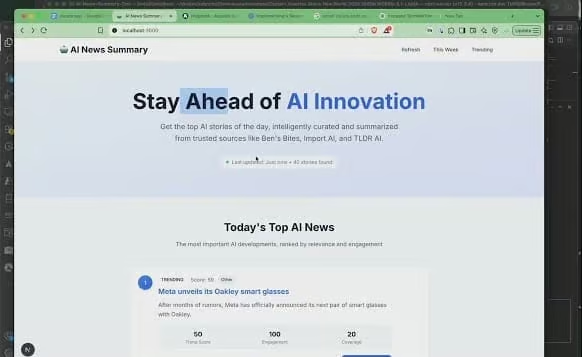
first you see the page load. I told it I
wanted a look and feel of Austo Digital.
This is what it brought back. It made
its own headline. We’re staying ahead of
the AI innovation. Tells me what was
last updated. And it found 40 stories.
It’s going to give me a listing of 10.
So, it’s got a trending score like how
popular is it? What sites is it being
shown on? Is this data somewhere else?
Notice the trend score here is
different. I think I need to get these
two to align. Engagement, there’s been
100 people engaged in it and it’s got a
coverage of a 20. Now, when I ask it to
build out a ranking, it did 35% across
the board for each one of these things.
And it’s doing a summary. So, here’s
just a list of articles. You can say
OpenAI pulls a promotional material on
John Amy due to the court order. And
right down here is kind of the summary.
And again, it’s got a different
engagement score. you know, is it as
popular or not as popular? And it’s got
some tags out there. Again, all this is
around AI. Um, I think we’ve got some
work to do to maybe define what these
mean, but it is doing its own ranking.
So, let’s go ahead and take a look at
this one. First, we’re going to go and
just click on the AI summary. This is
where now it grabbed the list. Now, it’s
summarizing the article. So, it gave me
a score. um some metrics like growth
mentions over time, social signals and
authority and then the number of sources
covering this is about 20. And so here’s
its summary. You can and it actually
tells me what it used. It’s not bad. And
then I can again go back to the homepage
or read the full article. My next step
on this is I would like to take
advantage of this article and generate
social posts. So the system hasn’t done
that yet. So let’s take a look how
claude works and how we can do that. Now
my original Claude um let’s go to the
file my original Claude file I told it
here at the bottom
that I wanted it to generate content
based on the selected story in LinkedIn
post a blog outline and maybe a Twitter
thread. So I’m going to go ahead and
just take this. We’re going to go back
down to the terminal and we’re going to
tell Claude what we want. And again,
terminal based. So, um,
let’s go. Uh, I would like
to implement.
All right. So, here I’d like to
implement the content generation
feature. Let’s let’s have a few options
on summary page to generate the
following. A blog post with a title, an
overview, some content, an image. I
probably should put the original link in
there, I suppose. Link to story and then
LinkedIn post based on the article
summary adding some relevance to a
gustodigital.com and using my voice as
the CTO and then a Twitter post that is
quick with a summary and a smart and
witty thoughts and an image. So, let’s
go ahead and have him do this. So, funny
story, I was all set to finish this demo
until Claude tapped me on the shoulder
and said, “You’re out of credits, buddy.
That’s right. Between this project and
another app I’m building, I officially
hit my usage limit. Claude’s on
vacation.
But that pause gave me a good excuse to
compare Claude Code to some of the other
tools in this space. Claude Code feels
closer to cursor. Very structured, very
competent, and surprisingly good at
handling big context and multi-step
reasoning. It’s not flashy, but it’s
consistent. Tools like lovable dev and
boltnew are a different vibe. They’re
more like windurf, casual, ide, and fun
to explore with. They lean more into the
creative code playground side of things.
Great for quick prototypes, UI first
thinking, and testing ideas without
needing full stack precision. So, if
you’re building something complex and
need a calm, high context co-pilot,
Claude Code is solid. If you’re
brainstorming, iterating quickly, or
just want to play with ideas, Lovable
and Bolt feel more fluid and fast.
That’s it for now. Claude’s resting, and
so am I. Catch you in the next one.
Let's work together.
Partner with Augusto to streamline your digital operations, improve scalability, and enhance user experience. Whether you're facing infrastructure challenges or looking to elevate your digital strategy, our team is ready to help.
Schedule a Consult